
Pivot Configurator
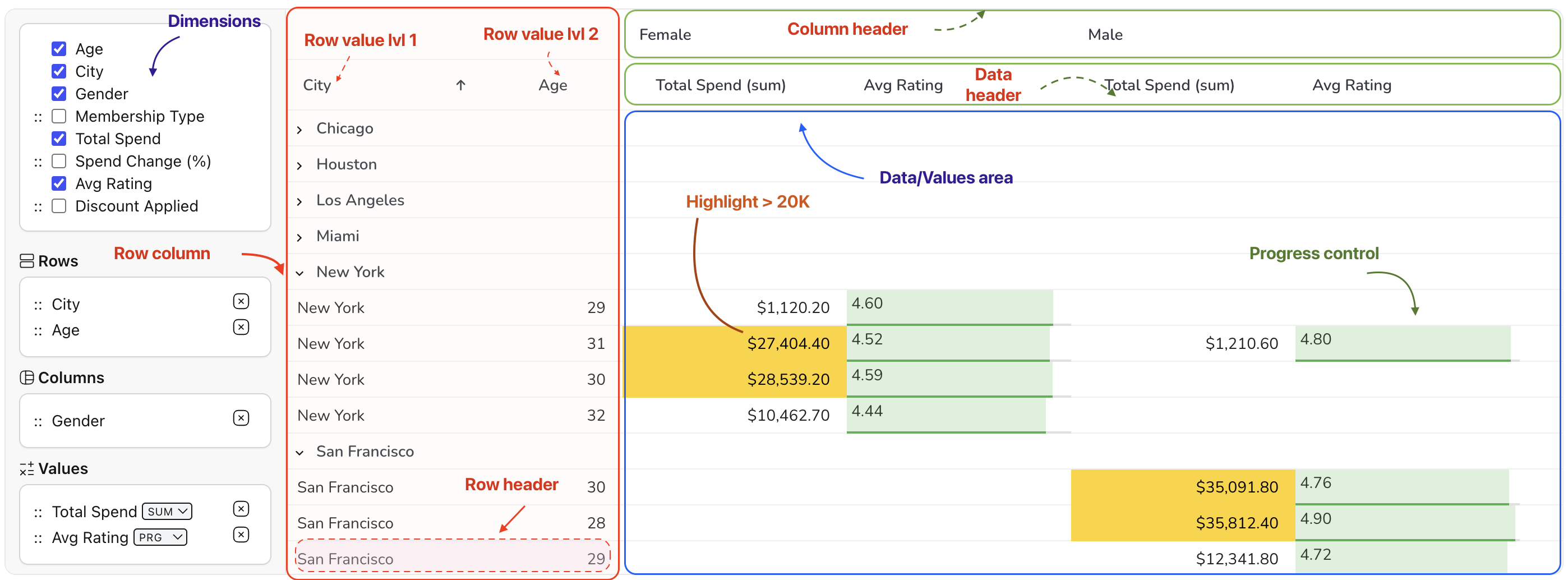
The Configurator component allows users to easily manage and organize fields within the pivot grid. It provides a drag-and-drop interface for fast customizations.
Managing Fields
Section titled “Managing Fields”Users can drag and drop dimensions into different areas to instantly change the data perspective:
- Rows: Defines the vertical hierarchy.
- Columns: Defines the horizontal grouping.
- Values: Defines which metrics are aggregated and displayed.
Field Persistence and Restrictions
Section titled “Field Persistence and Restrictions”Dimensions can be configured to have specific behaviors within the configurator. For example, you can hide certain dimensions from the configurator or restrict them to certain areas for a more controlled user experience.
const pivotConfig: PivotConfig = { dimensions: [ { prop: 'Protected Data', // Example of a dimension that might be used for internal calculations // but not exposed for dragging in the UI } ], // Initial state rows: ['Department'], columns: ['Quarter'], values: [{ prop: 'Sales', aggregator: 'sum' }]};Drag and Drop Interaction
Section titled “Drag and Drop Interaction”The configurator is highly interactive. When a user moves a field:
- The grid calculations are re-run based on the new structure.
- The pivot columns are regenerated.
- The UI updates in real-time to reflect the new data layout.