
Pivot Dimensions
Dimensions are the fields or properties that define the structure of the pivot grid, providing the basis for organizing and aggregating data across rows, columns, and values.
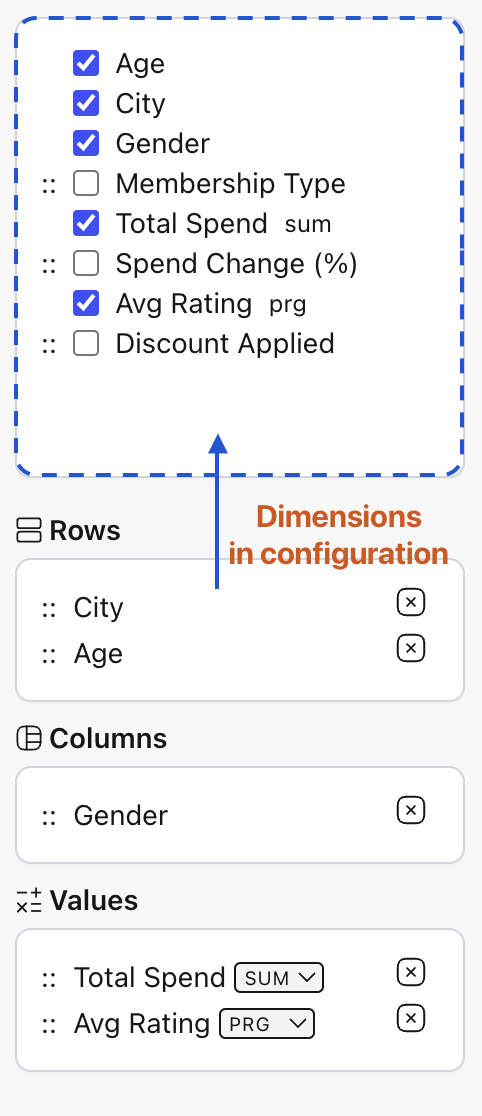
Dimensions allow users to segment data by categories or attributes, such as Age, City, or Gender, which can be placed in the respective areas (rows, columns) of the pivot grid.
Configuration
Section titled “Configuration”Technically, dimensions are instances of ColumnRegular. This means they can be configured just like any other column in RevoGrid: you can set names, templates, sizes, and more.
import { commonAggregators, type PivotConfig } from '@revolist/revogrid-enterprise';
const pivot: PivotConfig = { dimensions: [{ prop: 'Total Spend', name: 'Spending Amount', sortable: true, columnType: 'currency', filter: ['number'], cellProperties: ({ value }) => ({ class: { highlight: value > 20000, 'align-right': true, }, }), // You can define which aggregations are available for this specific dimension aggregators: { sum: commonAggregators.sum, avg: commonAggregators.avg, min: commonAggregators.min, max: commonAggregators.max, }, }]}Key Properties
Section titled “Key Properties”| Property | Description |
|---|---|
prop | The data property from your source objects. |
name | (Optional) The display name used in the configurator and headers. |
sortable | If true, pivot columns generated from this dimension will be sorted. |
aggregators | A map of available aggregation functions for this dimension. |
Hierarchical Structures
Section titled “Hierarchical Structures”Pivot Table supports complex hierarchical structures, allowing for expanded and collapsed rows based on the placement of dimensions. When multiple dimensions are placed in the “Rows” area, the grid automatically generates a tree structure to facilitate data drill-down.