
Totals
Totals help users move from detailed branch-level summaries to whole-table summaries. RevoGrid Pivot supports grand totals and subtotals through pivot.totals.
Calculation meaning
Section titled “Calculation meaning”Use the explicit numeric/scalar aggregation configuration when defining measure input. At each leaf, subtotal and grand-total grain, Pivot recomputes the configured operation from contributing facts. For groups [10] and [20, 20, 20], numeric AVG is 17.5 at the grand total, not 15. Distinct and paired weighted totals are likewise nonadditive. A weighted total uses eligible numerator/weight sums at that grain; a zero denominator is null.
Percentages retain numeric ratios: 0.5 means 50%. Hidden totals remain available as denominators; collapse/expansion changes presentation. Running percentage divides a prefix of ordered peer aggregates by that peer sum, not by displayed subtotal rows or only the viewport. Source filters change fact scope; result filters select groups and independently test totals, so totals need not equal the sum of retained displayed groups. Independent local values[].summaries can deliberately select different group/total operations; standard remote execution rejects these overrides.
Server totals must come from complete authorized source scope under the backend’s declared policy. aggregationSemantics pins execution location; it does not establish equal local/server null, count or precision semantics.
The Totals Config
Section titled “The Totals Config”totals: { grandTotal: true, subtotals: true, grandTotalLabel: 'All Sales', subtotalLabel: 'Subtotal',}What Each Option Does
Section titled “What Each Option Does”grandTotal: Adds a grand-total row. When column dimensions exist, it also adds grand-total value columns.subtotals: Adds subtotal rows for intermediate row branches and subtotal value columns for intermediate column branches.grandTotalLabel: Overrides the default"Grand Total"label.subtotalLabel: Overrides the default"Subtotal"label.suppressSingleChildSubtotals: Hides subtotal rows for single-source branches where the subtotal duplicates the only leaf.suppressGrandTotalWhenSingleLeaf: Hides the grand-total row when the whole result is one source-backed leaf.
Smart Suppression
Section titled “Smart Suppression”Pivot totals
Suppress duplicate single-child/subtotal/grand-total rows
Use suppression when totals are enabled for broad reports, but small filtered results should avoid duplicate summary rows:
totals: { subtotals: true, grandTotal: true, suppressSingleChildSubtotals: true, suppressGrandTotalWhenSingleLeaf: true,}Suppression is conservative. Multiple source rows, multiple meaningful leaves, or disabled subtotals / grandTotal keep the existing total behavior.
Row Totals
Section titled “Row Totals”When row fields exist:
- subtotal rows are inserted after the descendants of each branch
- the grand-total row is rendered separately and pinned at the bottom
This keeps the detailed body rows readable while still making the full-table total visible.
Column Totals
Section titled “Column Totals”When column fields exist:
- intermediate column paths can expose subtotal value columns
- the full column hierarchy can expose grand-total value columns
Pivot does not create a separate total table. Totals become part of the generated analytical structure.
Column Totals With Drill-Down
Section titled “Column Totals With Drill-Down”Column totals and column collapse are designed to work together. A collapsed group shows one aggregate carrier. Expanding that group keeps the parent aggregate visible as a subtotal column and reveals only the next configured level.
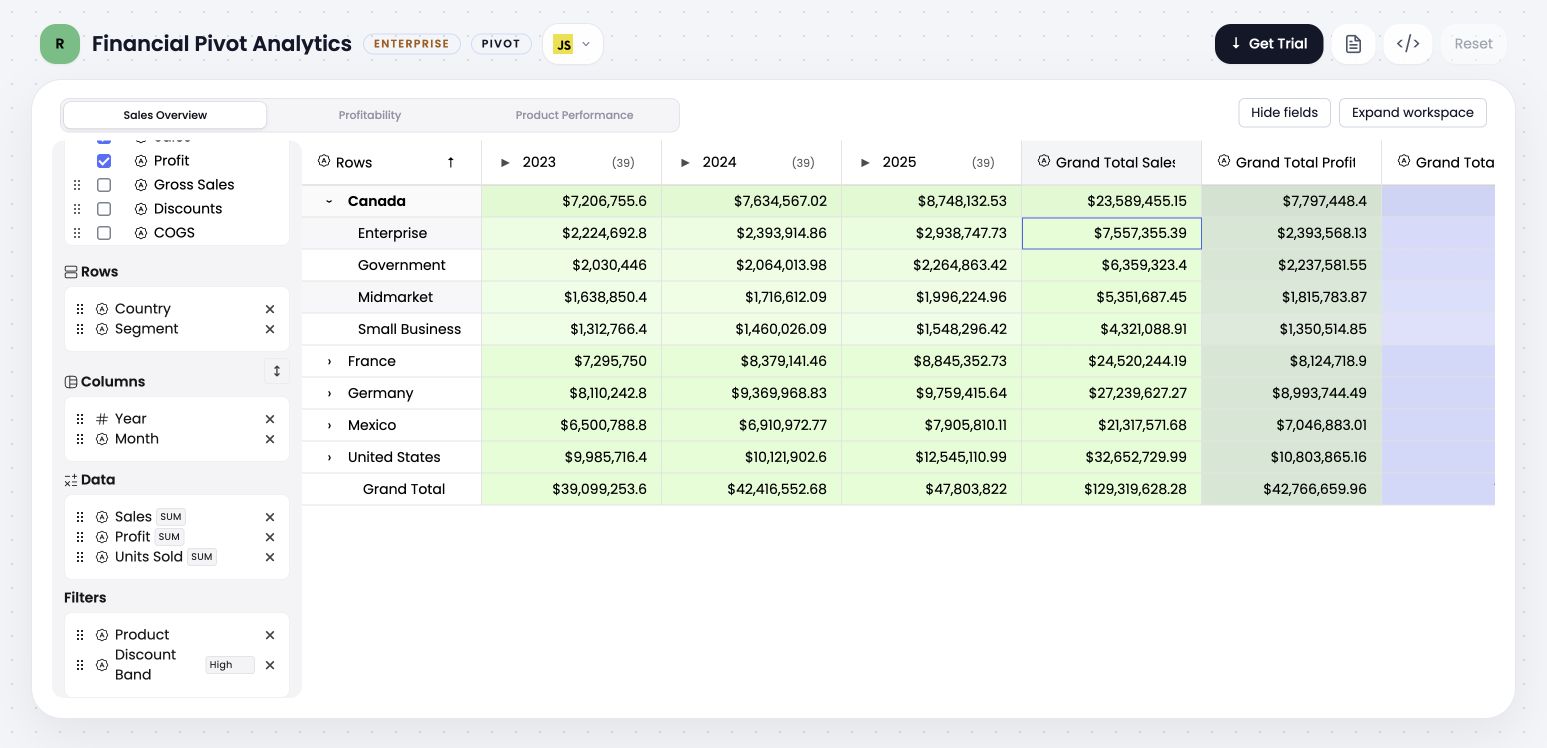
Collapsed years use one aggregate carrier per year. Grand-total columns remain independent from the branch collapse state.
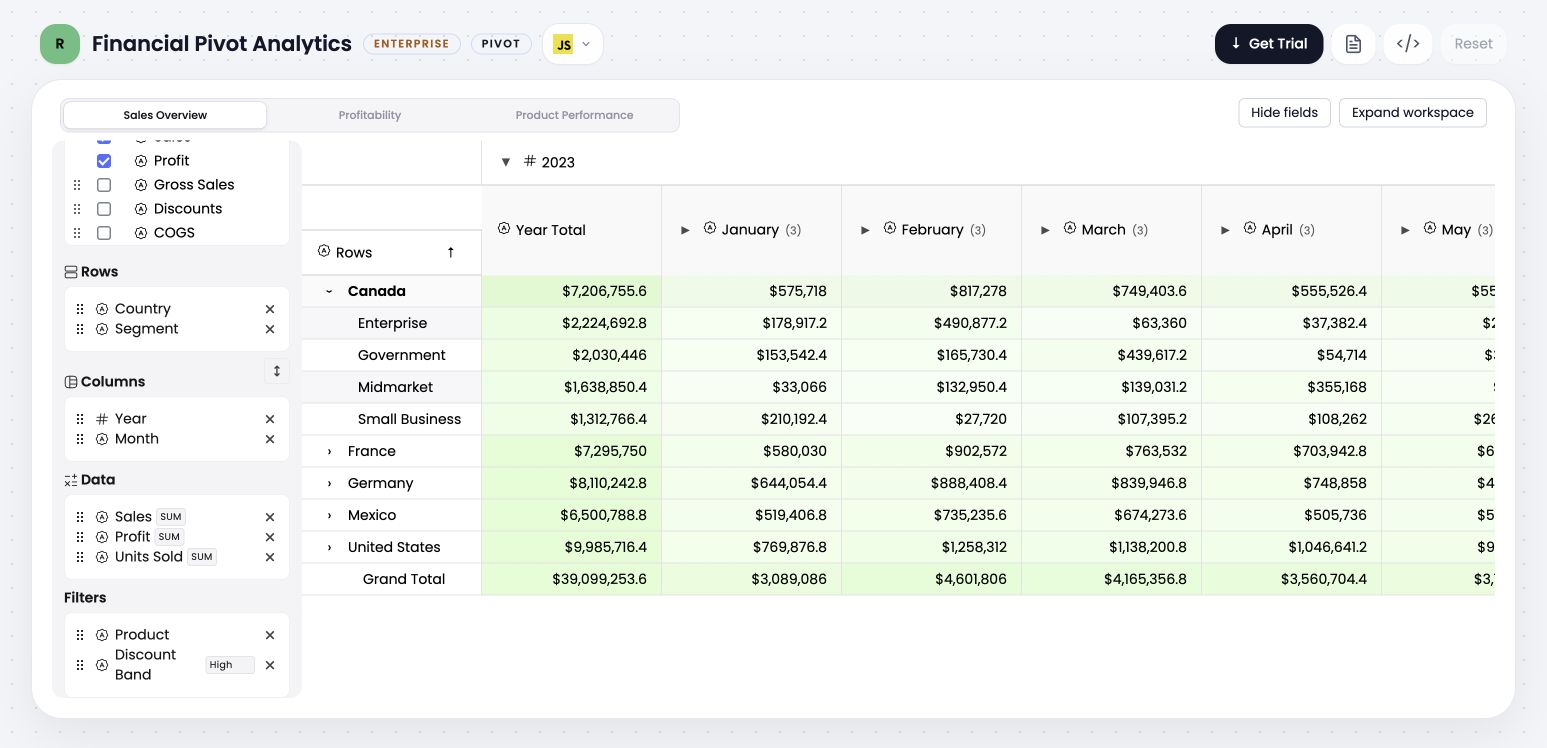
Expanding 2023 reveals its configured Year Total first, followed by the next-level month groups. The subtotal spans the otherwise unused lower header depth.
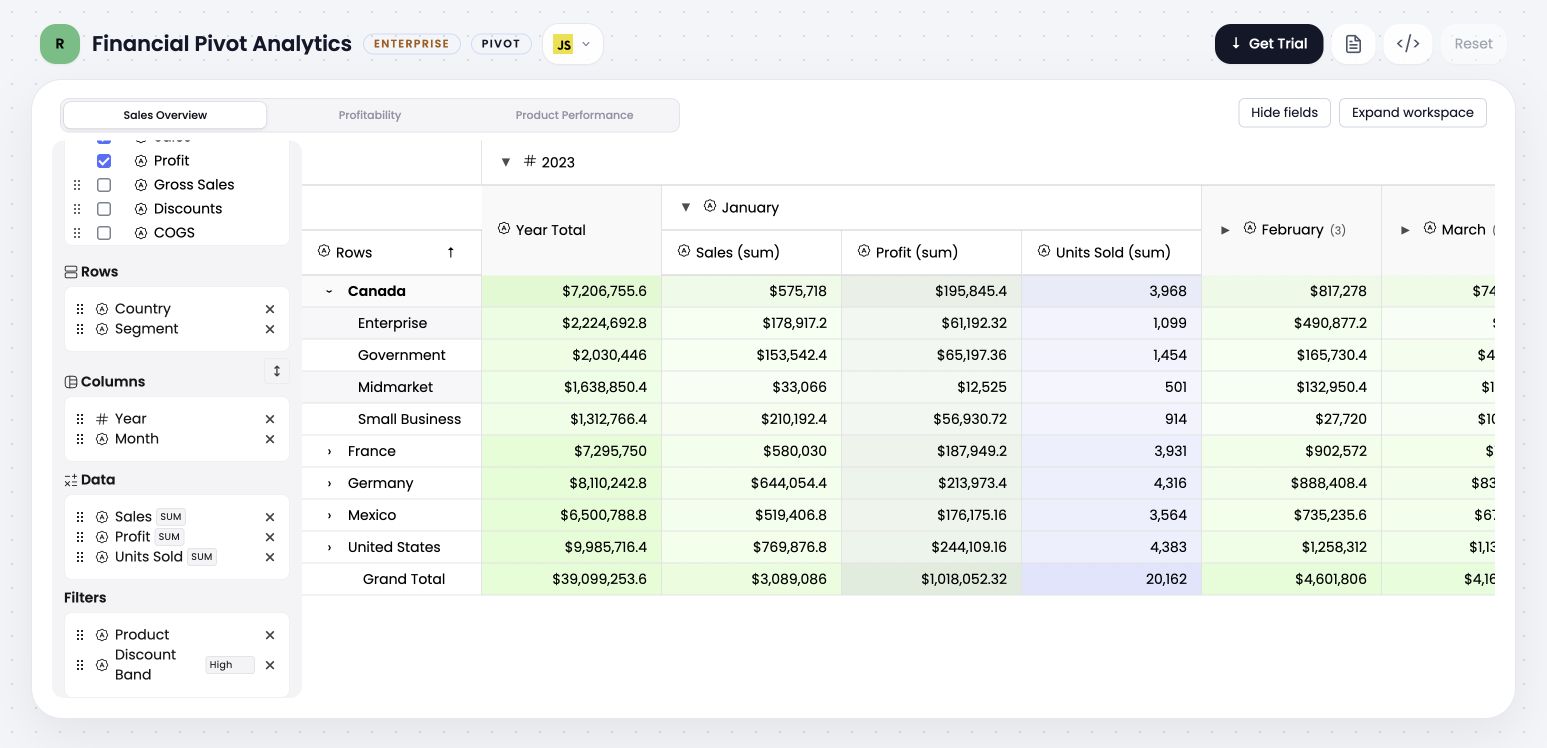
Drill-down is progressive: expanding January reveals only January’s measures. Sibling months stay collapsed and Year Total remains one Sales subtotal column.
Behavior Matrix
Section titled “Behavior Matrix”| Configuration | Collapsed group | Expanded group |
|---|---|---|
totals.subtotals: false | Uses the regular collapsed aggregate bucket. | Shows descendants without a parent subtotal column. |
totals.subtotals: true and the level subtotal is enabled | Uses the level subtotal as the aggregate carrier. | Shows the same subtotal plus the next visible descendant level. |
columnLevels[level].subtotal: false | Uses the regular collapsed aggregate bucket for that level. | Omits the subtotal for that level, even when other levels show subtotals. |
columnLevels[level].collapsible: false | The level cannot enter a collapsed state. | The level stays expanded; its subtotal can still be shown. |
subtotalPosition: 'before' | Position is not visible while the branch is compact. | Places the parent subtotal before descendant columns. This is the default. |
subtotalPosition: 'after' | Position is not visible while the branch is compact. | Places the parent subtotal after descendant columns. |
subtotalValues: ['sales'] | The compact carrier exposes only Sales for that subtotal. | The subtotal contains only Sales, while descendant groups can still expose every configured measure. |
totals.grandTotal: true | Grand-total columns and the pinned grand-total row remain visible. | Grand totals remain independent from individual branch expansion. |
Recommended Per-Level Configuration
Section titled “Recommended Per-Level Configuration”This configuration matches the screenshots:
const pivot: PivotConfig = { rows: ['country', 'segment'], columns: ['year', 'month'], values: [ { prop: 'sales', aggregator: 'sum' }, { prop: 'profit', aggregator: 'sum' }, { prop: 'unitsSold', aggregator: 'sum' }, ], columnCollapse: { enabled: true, collapsed: true, }, columnLevels: { 0: { collapsible: true, collapsed: true, subtotal: true, subtotalLabel: 'Year Total', subtotalPosition: 'before', subtotalValues: ['sales'], filterable: true, sortable: true, }, 1: { collapsible: true, collapsed: true, subtotal: false, filterable: false, sortable: false, }, }, totals: { subtotals: true, grandTotal: true, },};columnLevels uses the zero-based order of columns: level 0 configures
year, level 1 configures month, and so on.
Resolution And Precedence
Section titled “Resolution And Precedence”The following rules make mixed configurations predictable:
totals.subtotalsis the global subtotal gate. When it isfalse, nocolumnLevels[level].subtotalsetting can enable a subtotal.- With global subtotals enabled, an explicit
columnLevels[level].subtotaloverridestotals.disabledSubtotals.columnsfor that level. - An explicit
columnLevels[level].collapsibleoverrides the globalcolumnCollapsesetting for that level. When omitted, the level inheritscolumnCollapse.enabled. columnLevels[level].collapsedcontrols the initial state for that level and falls back tocolumnCollapse.collapsed.- Persisted
collapsedColumnsstate wins over both initial-state defaults for the matching generated group. subtotalLabel,subtotalPosition,subtotalValues,filterable, andsortableapply only to their configured level.- Grand-total columns do not belong to a generated hierarchy level, so
columnLevelsdoes not change them.
Filtering And Sorting Through Collapse
Section titled “Filtering And Sorting Through Collapse”The subtotal or collapsed aggregate represents one analytical group across both visual states. A filter or sort applied to that aggregate therefore stays active when the group expands or collapses:
- expanding does not broaden the filter to every newly visible child column
- collapsing does not discard the active filter or sort direction
- the active control moves between the compact carrier, parent group proxy, and visible subtotal without changing its analytical property
filterable: falseremoves aggregate filter controls for that levelsortable: falseremoves aggregate sorting for that level
The expand/collapse control appears before the group title. Expanding a group reveals one hierarchy level only; it does not expand its descendants or sibling branches.
Header Spanning
Section titled “Header Spanning”A direct subtotal such as Year Total fills the unused descendant header rows
vertically. It remains one value column; it does not span horizontally across
the descendant columns. This keeps the subtotal aligned with deeper headers
without covering the parent expand/collapse control.
Example
Section titled “Example”For:
rows: ['region', 'rep'],columns: ['year', 'quarter'],values: [{ prop: 'sales', aggregator: 'sum' }],totals: { grandTotal: true, subtotals: true },You get:
- leaf rows for each
region -> rep - subtotal rows for each
region - grand total at the bottom
- leaf value columns for each
year -> quarter - subtotal value columns for each
year - grand-total value columns across all years and quarters
Important Notes
Section titled “Important Notes”- Subtotals only appear when a hierarchy has more than one level to summarize.
- Grand totals use the configured label only for display. The internal total keys stay synthetic.
- A column subtotal remains the same analytical aggregate through collapse and expansion; only its header presentation changes.
- Per-level subtotal, collapse, filter, and sort settings are independent.
- In remote/server mode, totals stay part of the analytical contract and should be computed by the engine, not recomputed from visible UI cells.
Common Mistakes
Section titled “Common Mistakes”- Expecting
subtotals: trueto add subtotal rows when there is only one row field. - Expecting grand totals to stay inside the body rows. In the current implementation, grand total rows are pinned bottom rows.
- Assuming
subtotal: truecan bypasstotals.subtotals: false. - Assuming expanding a year should expand every month below it.
- Confusing a regular collapsed bucket with a subtotal carrier. They look similarly compact, but only a level with an enabled subtotal exposes that same subtotal as a visible column after expansion.
Continue with Values On Rows or Drill-Down.